For UK cleaning businesses
Cleaning business software. Less paperwork after every clean.
The clean is finished. The messages, diary updates and invoices aren’t. Keep your customers, bookings, quotes and invoices together — on your laptop and phone.
Start my free cleaning business trial14 days free · No card required · No automatic charges
Core £19.99/month for 1 user · Pro £39.99/month for 3 users after trial.
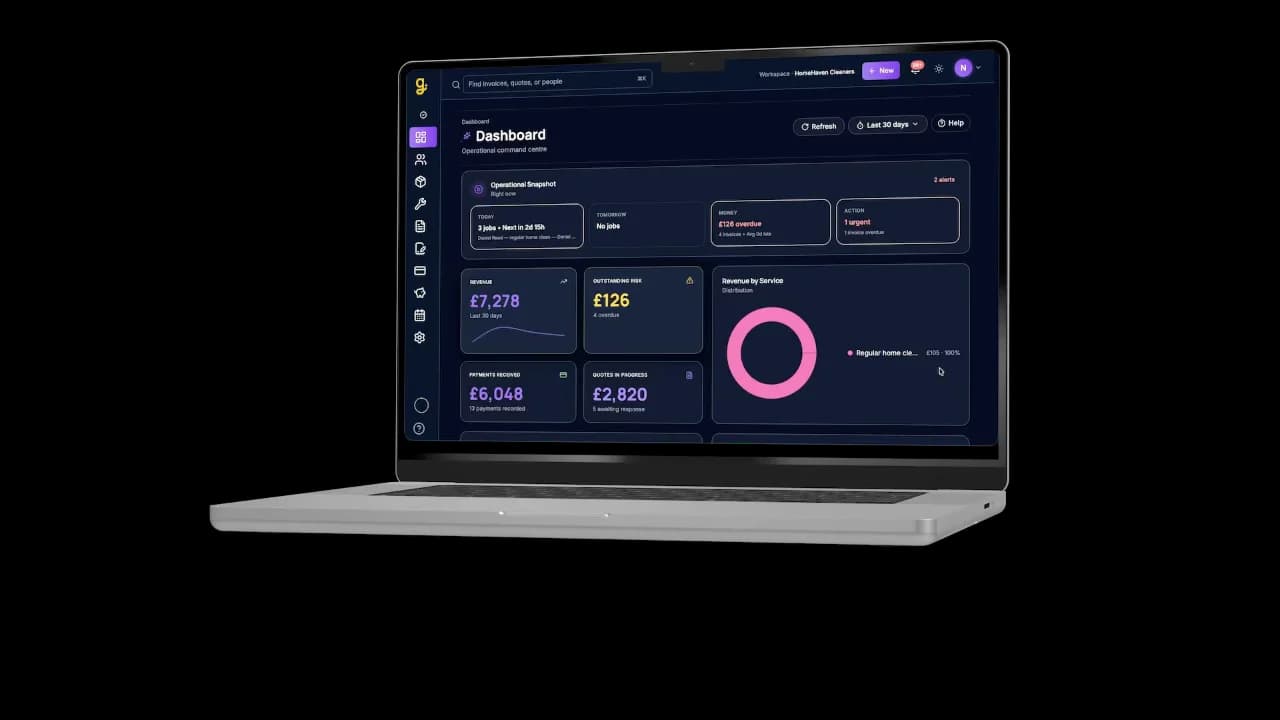
Laptop
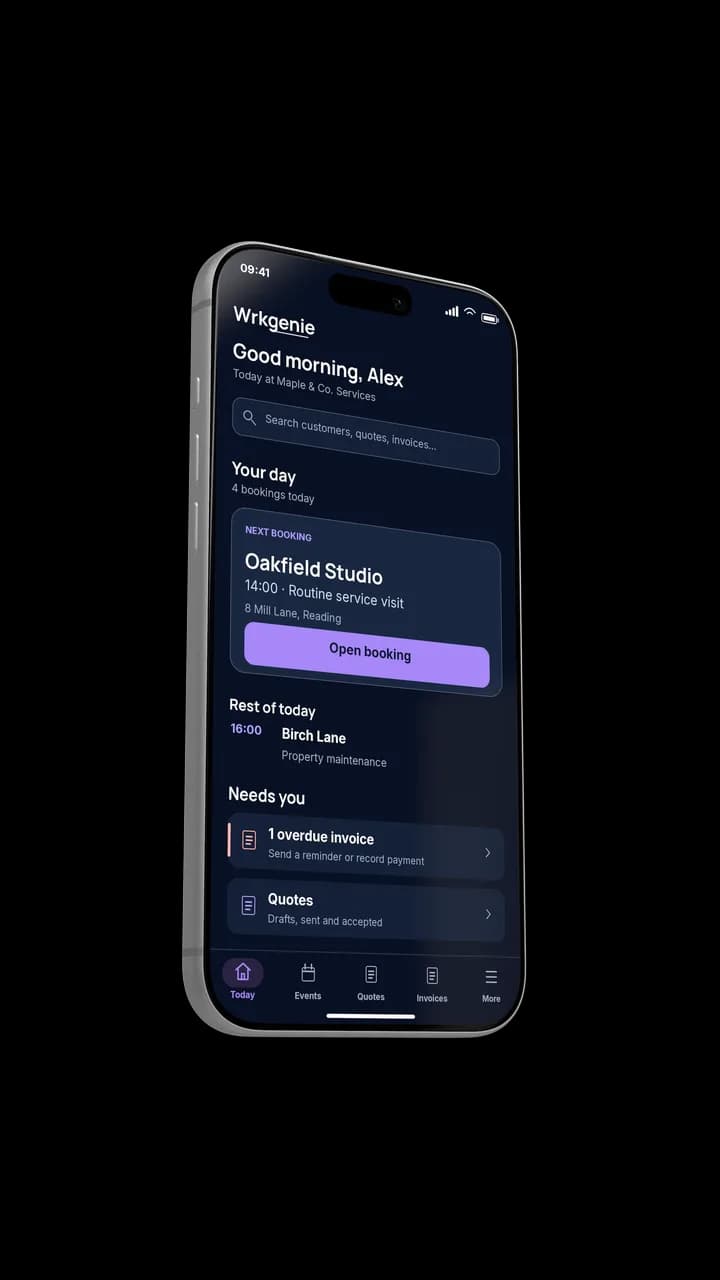
Phone
Product demonstrations with example data. One account across laptop and phone.
Used by Tikky Clean

Meet Tik, founder of Tikky Clean
“WrkGenie has helped us bring everything into one place. We can create professional quotes, manage bookings, keep track of customers and stay on top of invoicing without switching between different systems.”
Tik shares how she keeps bookings, customers and payments together with WrkGenie.
Start your free 14-day trialNo card required · No automatic charges
Read Tik’s full story →A real cleaning business
How Tikky Clean brought the admin together
01 / Before
Jobs were spread across WhatsApp, phone calls, notebooks and spreadsheets. As Tikky Clean grew, enquiries, bookings, quotes and invoices became harder to track.
02 / Working in WrkGenie
Tikky Clean uses professional quotes, customer records, bookings and invoicing together. The calendar helps organise work across the team on Pro.
03 / What changed
Tik describes more confidence when bidding for larger opportunities and an easier way to organise work, without switching between different systems.
“The professional quoting system gives us confidence when bidding for larger opportunities and the calendar makes it much easier to organise work across the team.”Read Tik’s full story →
From customer details to invoice
A place for the work around every clean
Here’s a simple example of the information you can organise.
Illustrative workflow with fictional cleaning details — not a screenshot or Tikky Clean customer data.
Step 1
Keep the customer and property details handy
Save a customer address and useful notes. Add the relevant location and instructions to the booking.
Customer & property
Example customer
Demo Cottage · Example address
Step 2
Know what matters at the next visit
Use notes for practical instructions and preferences, so the details are there when you need them.
Visit notes
Before you arrive
Call on arrival. Use the customer’s preferred products. No access codes in this example.
Step 3
Give the clean a place in the diary
Plan one-off or recurring visits in the web calendar. Pro adds staff scheduling and customer reminders.
Booking
Regular domestic clean
Tuesday · 09:00–11:00
Step 4
Prepare the invoice after the clean
Review the work and price, create your invoice and choose when to send it. Nothing is sent automatically when a booking is completed.
Invoice DEMO-001
£72.00
2 hours × £36.00 · Draft · not sent
Start with your business details, your first customer and a booking or quote. Your logo can wait until later.
How WrkGenie helps cleaning businesses stay on top of the day
Cleaning work runs on repeat visits, changeovers, access notes, and clear invoices. The real challenge is not just booking the clean — it is keeping the round, the customer history, and the payment flow moving without turning the phone into a second office. WrkGenie helps by keeping the next step visible before it becomes a missed job or a late invoice.
Domestic and regular home cleaners
Plan weekly and fortnightly visits in the web calendar. Save the customer address and useful preferences, then put the relevant instructions on each booking. Quote separately for extras or a deep clean, and create and review an invoice after the visit. Recurring bookings are available on Core and Pro; they do not generate invoices automatically. Before you agree a regular visit, use the house cleaning quote calculator to work through the visit price and frequency with your own figures.
Holiday let and Airbnb changeover cleaning
Changeovers mean working around check-out and arrival times. Use a booking for the agreed window and location, with notes for linen requirements or other instructions. Keep the paying customer’s details with the invoice. WrkGenie provides customer records, bookings and invoicing; this does not include an Airbnb reservation integration or a specialist property-management system. Use the holiday let changeover quote calculator to allow for the work involved before sending your quote.
End-of-tenancy and one-off deep cleans
Agree the rooms, condition, access and any extras before committing to a price. The end-of-tenancy cleaning quote calculator helps you build a price from your own assumptions. Record the agreed scope on a WrkGenie quote, arrange the booking and review the invoice when you are ready to bill. Use the cleaning job profit calculator to check the price against labour, travel and other costs.
Commercial and contract cleaning companies
Use a quote to agree the scope and price of a commercial clean. Keep customer information, booking locations and invoices organised, and review each invoice before sending it. Pro adds staff scheduling and customer reminders. If a contract needs specialist service-level reporting or complex multi-site billing, check that workflow during the trial.
Window cleaning rounds and specialist crews
Window cleaners often combine regular rounds with one-off commercial work. The round needs to repeat predictably; commercial jobs need a separate quote and invoice. If you also offer general cleaning, see our dedicated page for window cleaning business software, or explore quoting software and scheduling tools if you run mixed domestic and commercial work from one van.
What to check during your free trial
- Create one real customer record, then prepare a quote and check its preview.
- Book a visit in the web calendar and try a recurring schedule if you do regular cleans.
- If you manage staff, try Pro’s staff scheduling with your team’s working pattern.
- Create and review an invoice before sending it. Confirm any specialist reporting or billing needs before choosing a plan.
Whether you are a solo domestic cleaner, a small crew handling Airbnb changeovers, or a commercial contractor with multiple sites, the same principle applies: quotes, scheduling, and invoicing should live in one field service management software system — not across WhatsApp, paper diaries, and a separate invoicing app. That is what WrkGenie is built for, from £19.99/month with no long-term contract.
Free cleaning tools
Prepare a cleaning quote or invoice
Choose “Domestic cleaning” or “End-of-tenancy cleaning” in the builder, then add starter items. Edit the tasks, hours and your own prices before saving your document. No account is needed.
Include the rooms or areas, visit frequency and agreed extras in your description. Review the preview, then print or save as PDF using your browser, or download the finished HTML document. Save a copy before leaving.
Regular House Cleaning Quote Calculator
Price each residential cleaning visit and plan a weekly, fortnightly or four-weekly schedule.
Holiday Let Changeover Quote Calculator
What should I quote for this holiday-let changeover?
End-of-Tenancy Cleaning Quote Calculator
What should I quote for this end-of-tenancy clean?
Cleaning Job Profit Calculator
Did this cleaning job actually make money?
Free · no account needed · works on your phone
Related for cleaning businesses
- Quoting software →
Quote end-of-tenancy cleans, commercial tenders, and one-off deep cleans on site — send before you leave the property.
- Invoicing software →
Prepare and review invoices after a visit or for an agreed billing period. Online payment links require a connected payment provider.
- Scheduling software →
Plan recurring visits in the web calendar. Pro adds staff scheduling and customer reminders.
- CRM for cleaning businesses →
Keep customer addresses and useful preferences together, with the relevant location and instructions on the booking.
- Field service management →
Quote, schedule, invoice, and track payments in one system — built for mobile cleaning teams, not office dispatch desks.
Built for sole traders
WrkGenie is sole trader software — no office staff required, no enterprise modules you will never open. You quote on site from your phone, invoice the moment a job is done, and let Genie keep the next step visible so the business keeps moving without more admin. One person doing the work and running the business is the default, not an afterthought.
- Quote on site— build and send before you leave the customer's property
- Invoice immediately — payment link on the invoice, sent while the job is still fresh
- Manage jobs from your phone — diary, customer history, and outstanding payments in one app
- Flat pricing — from £19.99/month, no per-user fees for a one-person business
See how software for sole traders works for self-employed UK service businesses — electricians, plumbers, cleaners, and mobile service businesses.
Start with the plan that fits your cleaning business
Both work on laptop and phone. Try either for 14 days.
Core
£19.99/month after trial
1 user included
For managing your own cleaning work.
- Customer records and notes
- Quotes and invoices
- Bookings and recurring web-calendar visits
Pro
£39.99/month after trial
3 users included
For more control, with or without a team.
- Everything in Core
- Staff scheduling and customer reminders
- Expense tracking and profit insights
Core and Pro are free for 14 days with no card required. After the trial, access pauses until you add payment details and choose a paid plan. Core is £19.99/month for 1 user; Pro is £39.99/month for 3 users. No automatic charges at the end of the trial. Cancel anytime.
Common questions from cleaners
Can I manage recurring cleaning jobs?
Yes. In the web calendar, create recurring cleaning bookings, including weekly and fortnightly visits. Recurrence is included in Core and Pro. Review changes to the schedule when a customer moves or cancels a visit.
Does it work for small cleaning businesses and sole cleaners?
Yes. Core (£19.99/month) is built for solo cleaners; Pro (£39.99/month) adds expense tracking, profit insights and customer booking invitations and reminders, even if you work alone. Three users and staff scheduling are included when you need them.
Can I keep track of each client's property?
Save customer addresses and notes, and put the relevant location and instructions on each booking. Keep sensitive access details restricted to the people who need them.
Can I send an invoice straight after a clean?
Yes. Create and review an invoice after a clean, then choose when to send it. Completing a booking does not automatically create or send an invoice.
Is it really better than a spreadsheet?
WrkGenie brings customer details, bookings, quotes and invoices together. Tikky Clean describes keeping this work in one place instead of switching between messages, notebooks and spreadsheets. Recurring bookings do not automatically generate invoices.
Keep the next clean and the next invoice in view.
Start with one customer and one booking. Build from there.
Start my free trial14 days free · No card required · No automatic charges