For UK builders
Building software that keeps multi-day jobs connected
Job management software for UK builders and contractors
Built for builders. Quote extensions, track phases, and invoice on site — from £19.99/month.
Free for 14 days · No card required · Cancel anytime
On your laptop and phone · iPhone · Android · Web
Your day, on the phone
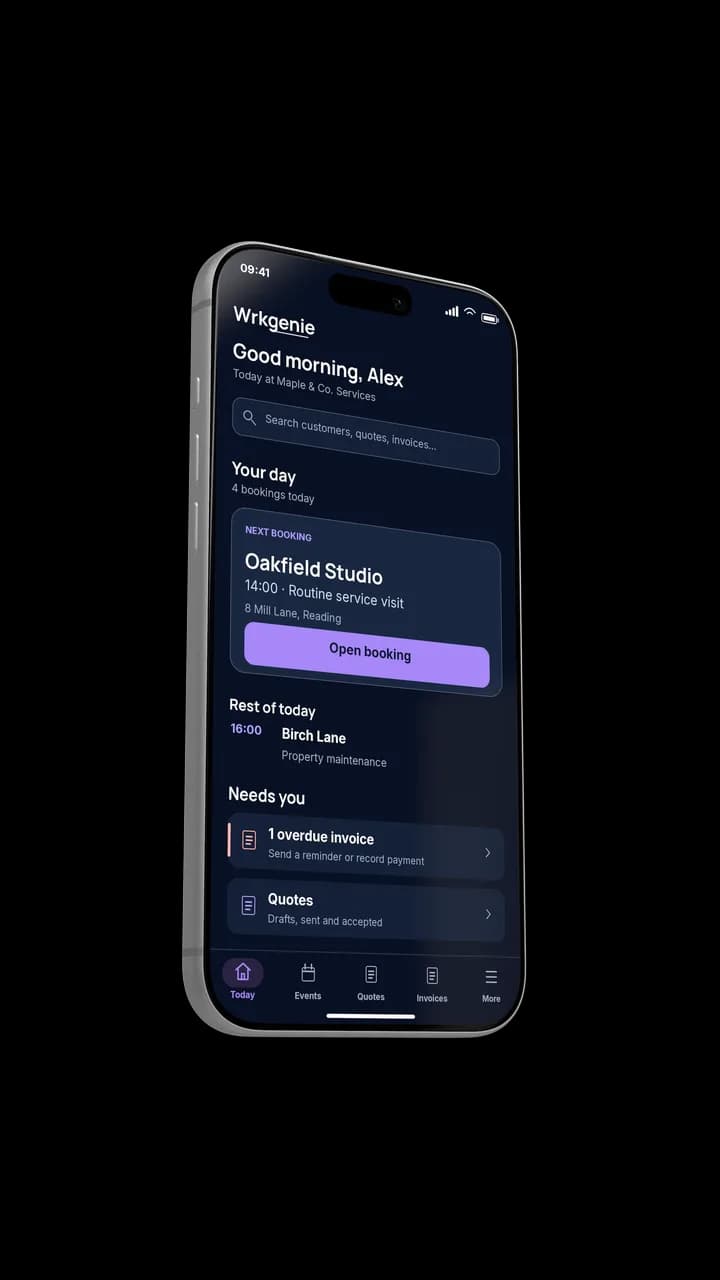
Your whole day, at a glance
How builders actually work
Building work spans days, people and money
A building job runs over weeks, involves materials and sub-contractors, and is paid in stages. What hurts is when the quote, the phases, the costs and the invoices are held together by memory and a spreadsheet.
From survey to completion
The loop that keeps a longer job connected from deposit to final invoice.
- 1
Survey & quote
Materials, labour and sub-contractor costs itemised and sent.
- 2
Deposit
The deposit invoice is raised from the accepted quote.
- 3
Work in progress
Phases, notes and changes stay on the same job record.
- 4
Stage invoices
Mid-build and completion invoices raised from the same record.
- 5
Paid
Each payment lands back on the job and the customer.
The whole build, one record
The customer, the quote, the phases and the payments stay connected on the same record from deposit to completion.
What matters most for a builder
The capabilities that earn their keep keep the money and the job connected across a long build.
One job record through the build
Quotes, phases, costs and notes stay together from survey to completion.
Itemised quotes
Materials, labour and sub-contractor costs on separate lines, sent the day you survey.
Staged invoicing
Deposit, mid-build and completion invoices from the same record — cash flow stays steady.
Profit and expenses
Costs logged against the job so you can see how the build is actually doing.
Built for the phone
The site is the office
The quote, the phases and the invoices all happen on a phone on site — not on a laptop at the end of the week.
Poor signal · Offline included on every plan
Works where the signal is thin
Core work — the job, the notes and the invoice — keeps going when the signal is poor on site, then catches up when you are connected. Online payment processing, e-signing and AI help need a connection.
WrkGenie Pro
More control with Pro
See what you’re earning, keep track of expenses, and organise who’s doing the work — whether you work alone or with a team.
- Profit insights and business expenses
- Team and staff bookings
- Customer booking invitations and reminders
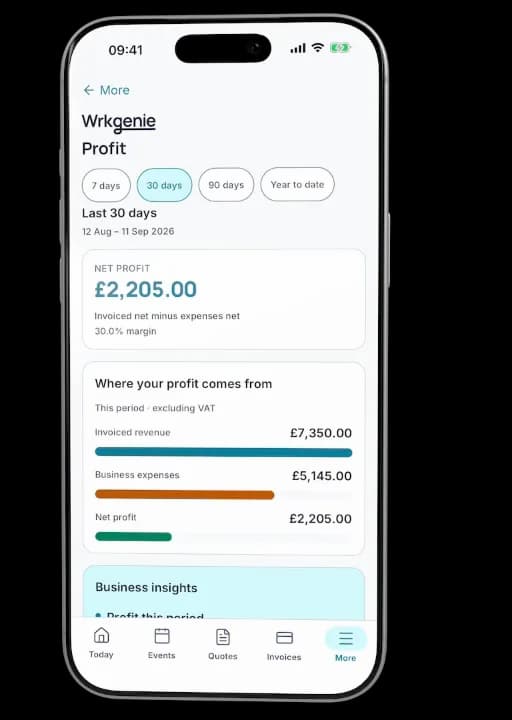
Profit, expenses and bookings in one place
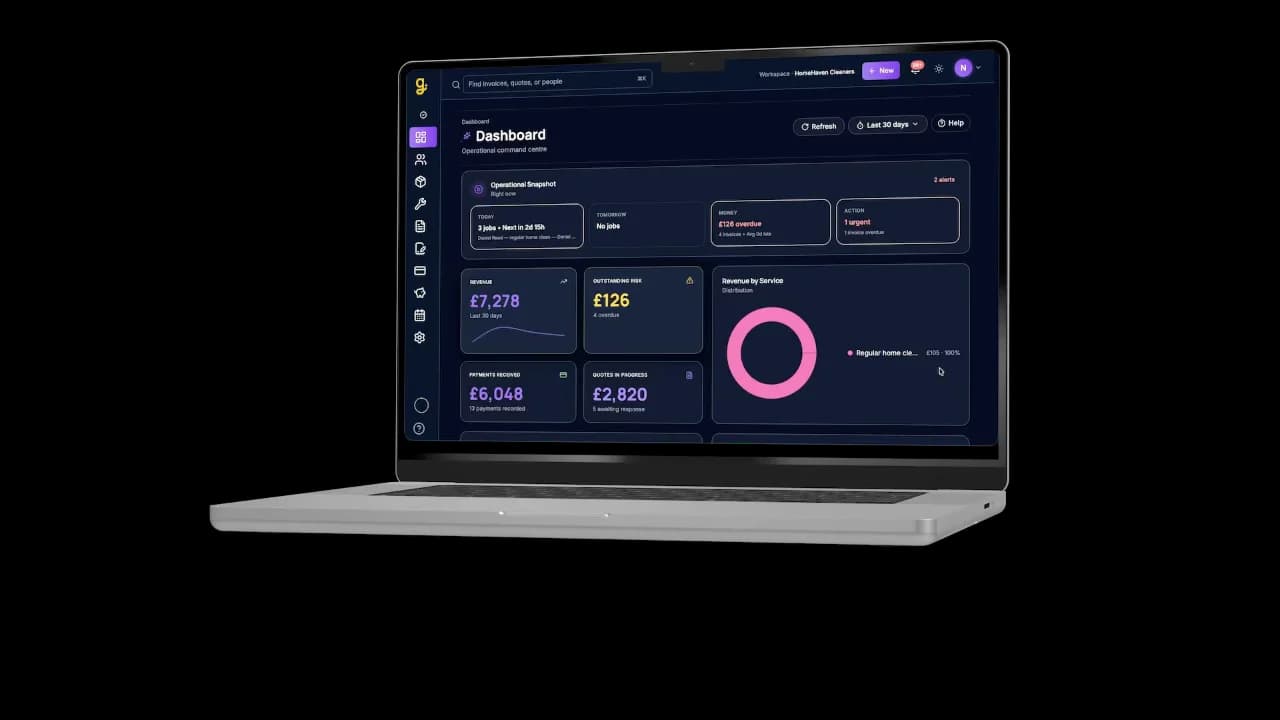
Same business, bigger screen
Desktop
See what needs your attention
Open WrkGenie on your laptop for a bigger view of upcoming work, outstanding invoices and the jobs that need a follow-up. Everything stays connected to your phone.
Free tool
Profit margin calculator
Check the margin on a quote before you commit — materials and labour eat it fast.
Free · no account needed · works on your phone
Where this fits the wider product
Keep the build connected
Quotes, phases, costs and invoices in one place — so a multi-day job never drifts apart and the money follows each stage.
Start your 14-day free trialCommon questions from builders
Can I manage a multi-phase building project?
Yes — log a project once and track it from deposit to practical completion. Invoice at key milestones (deposit, mid-build, completion) rather than one lump sum at the end, which most customers prefer anyway.
Does WrkGenie handle CIS deductions?
WrkGenie isn't a payroll tool, but you can log sub-contractor costs and notes against each job — useful for keeping your CIS records alongside your accountant. You can record gross sub-contractor amounts for reference when handling deductions with your accountant.
Can I track sub-contractors within a project?
Yes — add sub-contractor costs and notes against the same job record so the full picture of a build stays in one place. Useful when you're coordinating groundworkers, electricians, or plasterers on the same job.
Does it work for small building firms and sole-trader builders?
Yes — Core (£19.99/month) is designed for owner-operated builders and sole traders. Pro is available when you have a team to coordinate.
Is it better than a spreadsheet for a builder?
If you're running two or three jobs at different phases at once, the main win is knowing exactly where each job is, what's been invoiced, and what's outstanding — without rebuilding a tracking file every week.
Simple pricing. No surprises.
Core and Pro: 14 days free · No card required · No automatic charges after the trial.
Android, iPhone, Web and AI writing assistance included with every plan.
On your laptop and phone · iPhone · Android · Web
Core
Everyday essentials for solo businesses
Free for 14 days
- 1 user included
- Customers & contacts
- Products & services
- Quotes with customer e-signing
- Bookings & calendar
- Invoices & payment recording
- Invoice payment links via Stripe
Free for 14 days · No card required · Add payment details to continue
Pro
More control for solo owners and teams
Free for 14 days
- 3 users included
- Everything in Core
- Track business expenses
- Team & staff bookings
- Customer booking invitations & reminders
- Profit dashboard on Web · Profit snapshot on mobile
Free for 14 days · No card required · Add payment details to continue
White Label
Your business. Your branding.
Available through a sales enquiry
- 5 users included
- Everything in Pro
- Custom logo & business branding
- Custom domain
- Google & Outlook calendar sync
- Custom email sending
Contact us to discuss your branding and setup.
Core includes invoice payments. Choose Pro for expense tracking, profit insights and customer booking notifications — whether you work alone or with a team.
Can I take invoice payments on Core?
Yes. Record payments against invoices and let customers pay through an invoice payment link. Online card payments need a connected Stripe account; Stripe processing fees apply.
Is Pro useful if I work alone?
Yes. Pro adds expense tracking, profit insights and customer booking invitations and reminders. You can use those features as a solo owner. Three user accounts and staff scheduling are included if you also need a team.
Do I need to enter my card details?
No — no card is required to start your 14-day free trial. Add your payment details before your trial ends to continue. No automatic charges.
What happens after 14 days?
Your access is paused. Add a payment method and choose a plan to continue — no automatic charges are taken.
Can I cancel easily?
Yes — you can cancel in just a couple of clicks from your account settings. No contracts, no exit fees.
How do I cancel?
Log in to your workspace, go to Settings → Billing, and click Cancel subscription. Your subscription remains active until the end of the current billing period — no immediate cut-off.
Compare what is included
| Feature | Core | Pro | White Label |
|---|---|---|---|
| Invoice payment recording | |||
| Invoice payment links via Stripe | |||
| Bookings & calendar | |||
| Customer booking invitations & reminders | |||
| Expense tracking & profit insights | |||
| User accounts included | 1 user | 3 users | 5 users |
| Role-based permissions | |||
| Read-only (viewer) access | |||
| Admin role | |||
| Invite team members by email | |||
| Team & staff bookings |
Cancel in 2 clicks. No contracts. No exit fees.
Real human support — we reply within one working day.
All prices in GBP (£). WrkGenie is not currently VAT registered. Prices shown are the full amount charged. Plans renew automatically each month from the recurring price shown. Cancel anytime in your account settings. Payments processed securely by Stripe. See our Billing Terms and Refund Policy.
Ready to run your business from your phone?
Start your free 14-day trial and see how much lighter the day feels when quotes, bookings and invoices live in one place.
On your laptop and phone · iPhone · Android · Web
14 days free · Core £19.99/month for 1 user · Pro £39.99/month for 3 users
No card required to start · No automatic charges after the trial · Cancel anytime