Booking · UK small businesses
A booking system for small service businesses
WrkGenie keeps the bookings your business takes in one diary — created in seconds, moved when the day shifts, and connected to the customer, the quote and the invoice. Not a customer-facing self-booking portal: a system where the bookings you make are always in the right place and carried through to the work.
Bookings fall apart when they live in messages
A customer books over the phone or WhatsApp, the appointment lands in a message thread, and by the time the day starts nobody's quite sure what was agreed or where it is. The booking needs to be a record, not a conversation.
- Bookings taken in messages never make it into the diary
- An appointment is confirmed but the details aren't attached to a customer
- The day drifts when bookings get moved or interrupted
- Repeat bookings have to be recreated from scratch every time
What a booking system should do for you
A booking system isn't really about appointments — it's about keeping the rhythm of the business when the phone and the diary pull in different directions.
Bookings in seconds
Add a booking straight from the customer record, with the date, time and job details attached from the start.
A diary you can move
Reschedule when a job overruns or a customer cancels — the booking keeps its customer, notes and quote when it moves.
Conflict detection
The calendar flags clashes before they become a problem on the day.
Repeat bookings
Weekly, fortnightly or monthly bookings set once and roll forward — for rounds, salons and regular services.
The booking becomes the job
A booking isn't a dead end. It carries through into the work, then the invoice — all on the same record.
A clear picture of the day
See what's booked and what's coming up, so the day is a plan rather than a series of surprises.
The day's bookings, at a glance
Everything booked is visible in one diary — each booking carrying its customer, its job details and its next step.
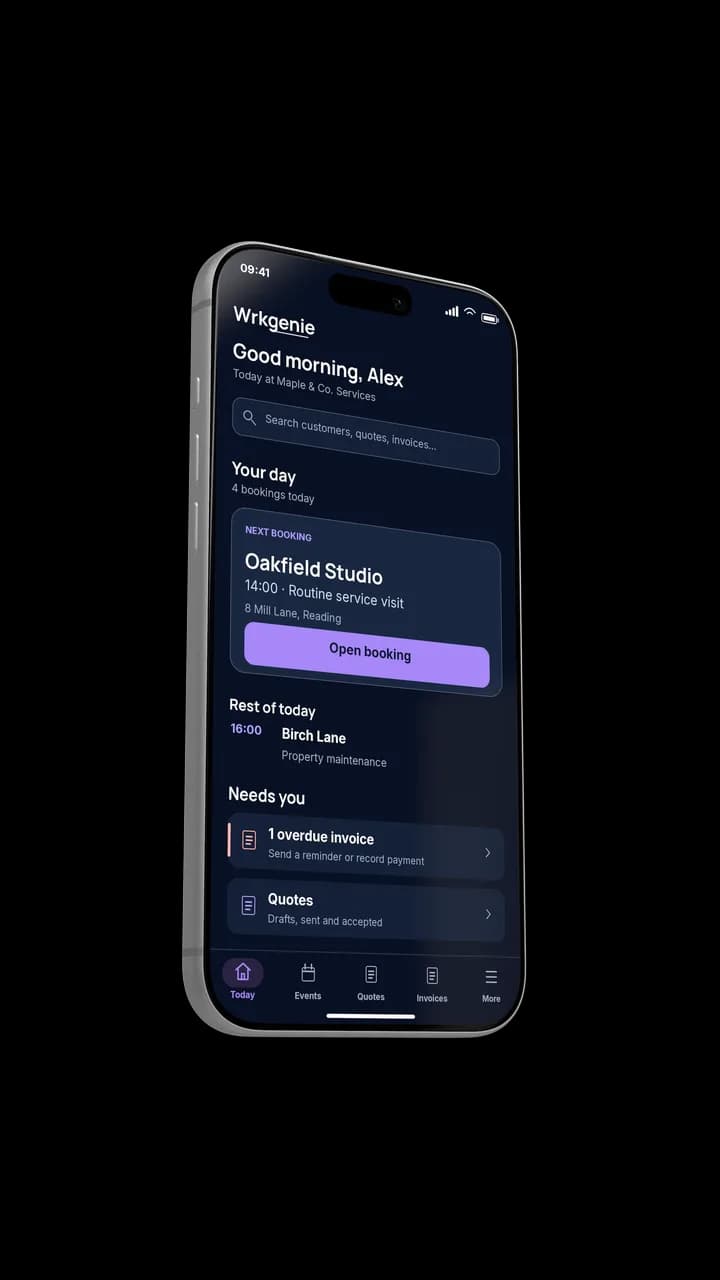
Your whole day, at a glance
A booking is only useful if it becomes work
The booking starts the job. Follow the flow through scheduling and job management to see how the day stays connected from first appointment to final payment.
Built for appointment-heavy businesses
Cleaners, groomers, beauty and maintenance businesses live on repeat bookings. These industries show how the diary works in practice.
Related capabilities
Tools & guides
Common questions about booking systems
Is WrkGenie a customer self-booking portal?
No. WrkGenie's booking system is built around the way small service businesses actually take bookings — over the phone, by message or in person — and then manage them in one diary. It's not a public self-booking page where customers pick a slot themselves. The value is that every booking you take is a proper record, connected to the customer and carried through to the job.
Can I manage bookings from my phone?
Yes. WrkGenie is a native phone app — add, move and view bookings from anywhere, between jobs.
Can I set up recurring bookings?
Yes. For weekly, fortnightly or monthly appointments, set the booking to repeat and it rolls forward in your diary at the interval you set.
Does the system catch double-bookings?
Yes. The calendar flags conflicts before they become a problem, so a clash is caught while you can still do something about it.
Does a booking connect to invoicing?
Yes. When the booked work is done, raise the invoice from the booking in one step — the customer, details and price are already there.
Ready to run your business from your phone?
Start your free 14-day trial and see how much lighter the day feels when quotes, bookings and invoices live in one place.
On your laptop and phone · iPhone · Android · Web
14 days free · Core £19.99/month for 1 user · Pro £39.99/month for 3 users
No card required to start · No automatic charges after the trial · Cancel anytime