For UK electricians
Electrician Software for UK Electrical Contractors
Quote EICR work, manage callouts, and invoice on site — electrician software built for UK sparks
Electrical contractor software from £19.99/month. No contracts. Quote, schedule, and invoice without the paperwork.
Free for 14 days · No card required · Cancel anytime
On your laptop and phone · iPhone · Android · Web
Your day, on the phone
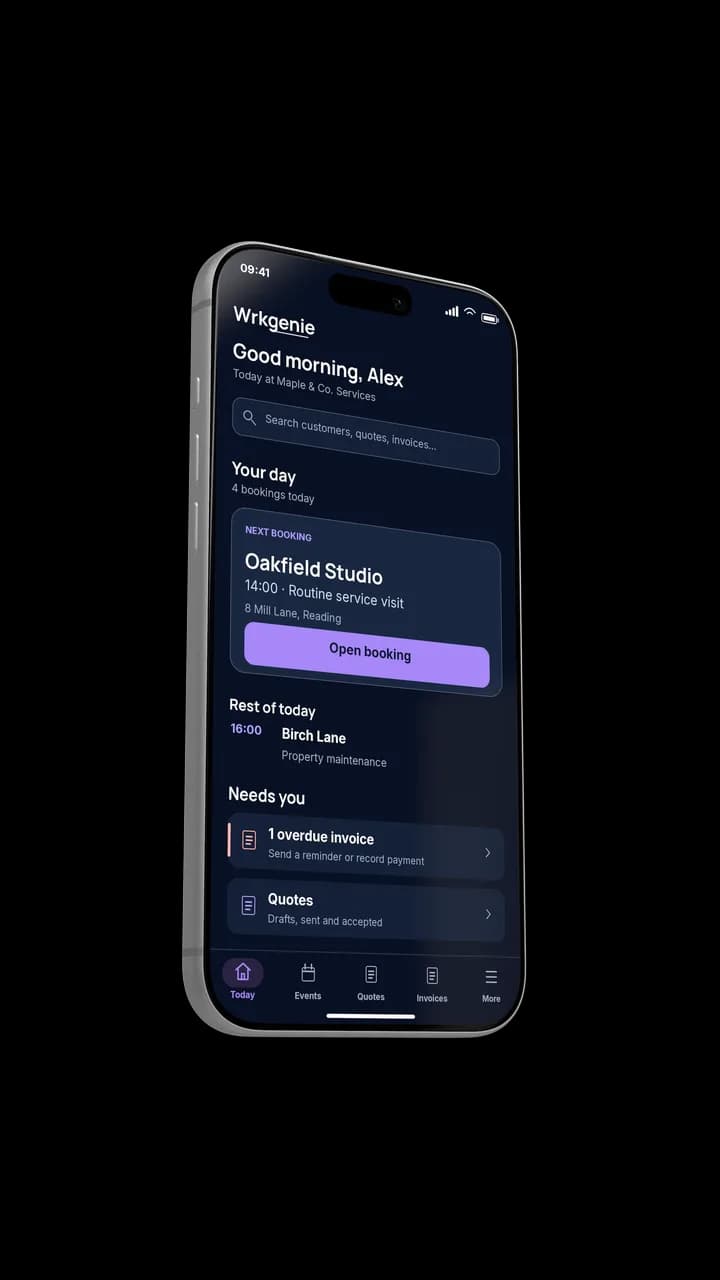
Your whole day, at a glance
How electricians actually work
Electrical work moves between sites all day
The day is a sequence of different properties, different jobs and different customers. What keeps it coherent is the job history and the quote-to-invoice trail staying with each customer as you move between them.
From site visit to signed off
The loop that keeps each site's work and payment connected.
- 1
Customer & site
The property, the work and the history sit on one record.
- 2
Quote
Install or inspection work priced from the phone.
- 3
Booked
The job lands in the diary between other site visits.
- 4
Completed
Marked done on site, notes kept with the customer.
- 5
Invoice
Raised and sent the moment the job is signed off.
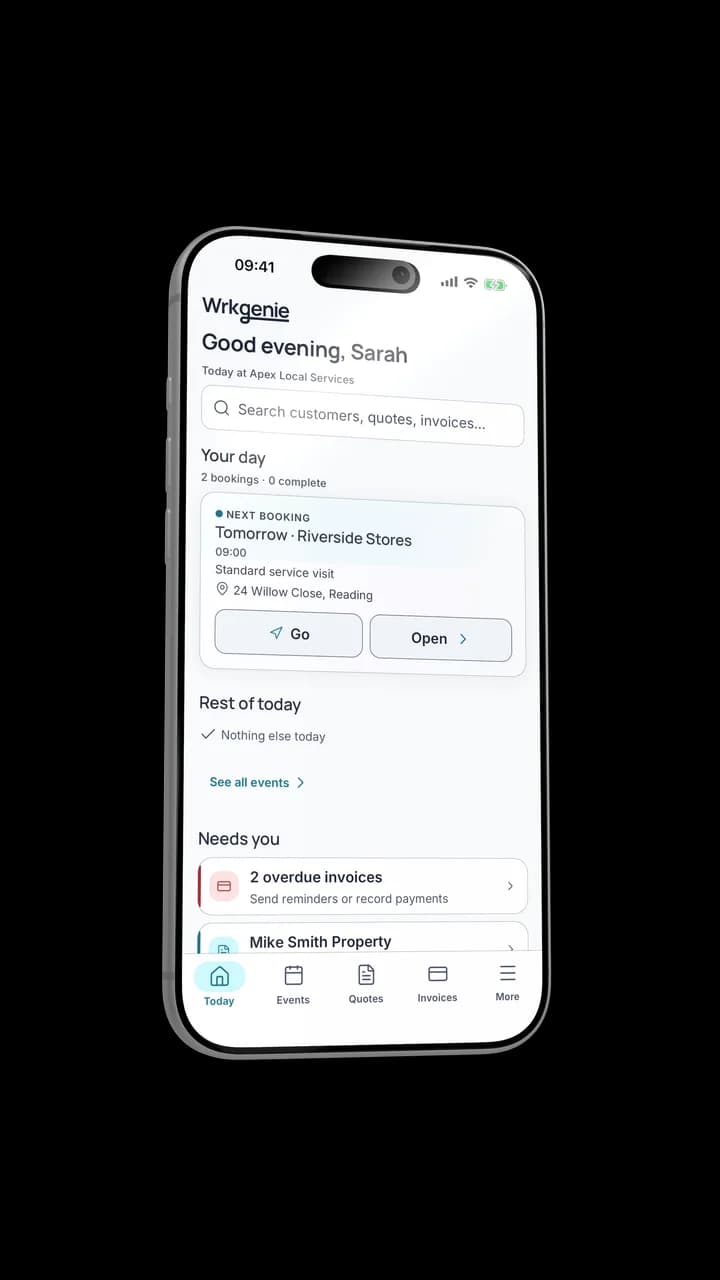
Keep the job and its details together
The job moves from site to invoice
The visit becomes a job, gets completed on site, and turns into an invoice — all on the same phone, on the same record.
What matters most for an electrician
The capabilities that earn their keep hold the day together between sites.
A diary across sites
Callouts, testing and installs share one calendar, moved from the phone.
Quotes that become jobs
Price the work, get it accepted, and carry it straight into the booking.
Job history per customer
Landlords and repeat commercial work start from what was done last time.
Invoice at sign-off
The invoice goes out the moment the work is done, with VAT when registered.
Built for the phone
The site is the office
Between jobs there is no desk. Quotes, the diary and invoices all happen on a phone while the work is fresh.
Poor signal · Offline included on every plan
Keeps working between sites
Core work — the visit, the quote and the invoice — keeps going when the signal drops on site, then catches up when you are connected. Online payment processing, e-signing and AI help need a connection.
WrkGenie Pro
More control with Pro
See what you’re earning, keep track of expenses, and organise who’s doing the work — whether you work alone or with a team.
- Profit insights and business expenses
- Team and staff bookings
- Customer booking invitations and reminders
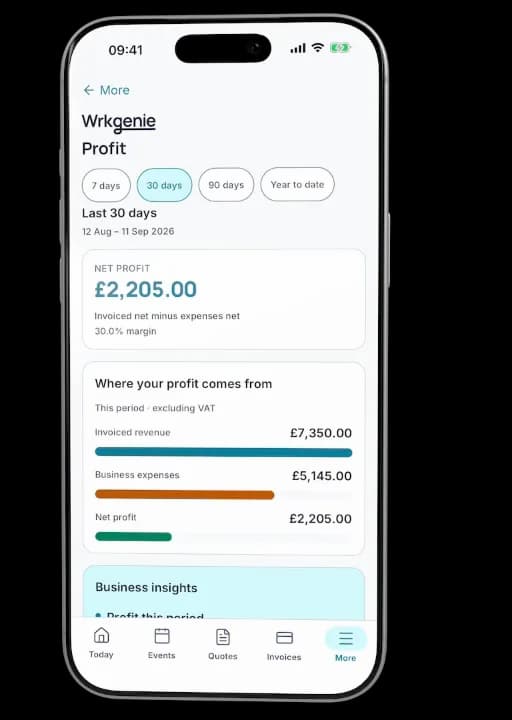
Profit, expenses and bookings in one place
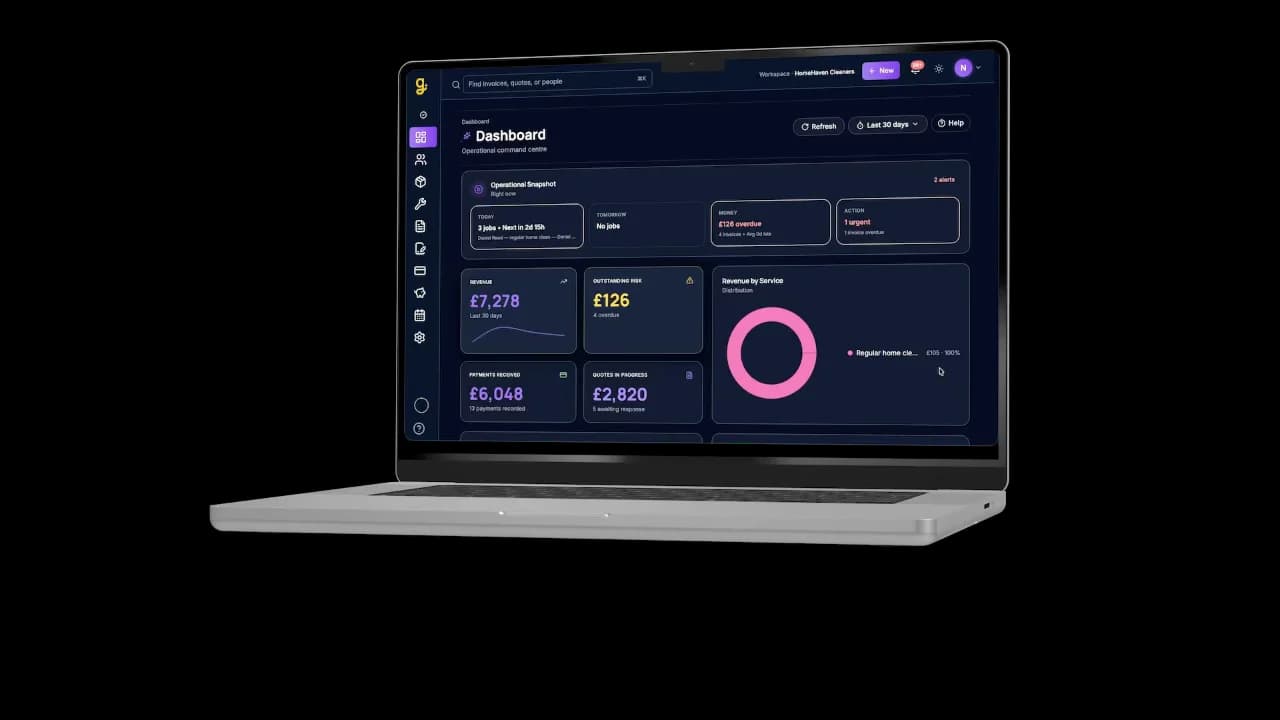
Same business, bigger screen
Desktop
See what needs your attention
Open WrkGenie on your laptop for a bigger view of upcoming work, outstanding invoices and the jobs that need a follow-up. Everything stays connected to your phone.
How WrkGenie helps electrical businesses stay organised
Electrical work is rarely one neat job. It is a mix of callouts, site visits, quotes, test notes, and follow-up invoices. WrkGenie helps keep that flow connected so you can move from the first call to the final payment without losing the detail that matters on the next visit.
Domestic electricians
Consumer unit upgrades, socket additions, and partial rewires all need clear quotes with labour and materials separated — customers compare three electricians and the professional quote often wins before price does. WrkGenie lets domestic electricians build quotes on site, send a PDF before leaving, and convert accepted work straight into a scheduled job. When the install is signed off, the invoice goes out the same day rather than sitting in a notebook until Sunday night.
Commercial and maintenance electricians
Commercial contracts — shops, offices, landlords with multiple properties — run on repeat visits, agreed rates, and monthly invoicing in arrears. Electrical contractor software needs to hold each site under one client account and store access arrangements and previous test notes on the site record, so repeat visits and periodic inspections are easy to schedule and invoice when they come due. WrkGenie keeps that history on the customer record so when a facilities manager calls about a tripped breaker, you know what was done last time without digging through emails.
EICR and inspection work
Electrical Installation Condition Reports need consistent pricing, clear scope on the quote, and fast turnaround once testing is complete. Quote the inspection and any remedial work as separate lines so the landlord sees exactly what they are paying for. When remedials are needed, revise the quote in one place rather than starting a new document. Invoice the inspection and any follow-up work from the same job record so nothing slips between the survey, the remedial quote and the payment. WrkGenie doesn’t generate the EICR certificate itself — that comes from your own testing and reporting — but the pricing, the job and the invoice around it stay organised in one place.
Emergency callouts
Not every electrical fault needs a formal quote first — tripped RCDs, power outages, and safety issues often mean attend now, invoice after. Good electrician software lets you skip the quote step when the situation demands it, log what was found and fixed on site, and send the invoice before you leave the property. That speed matters for callout work where the customer expects immediate resolution and a same-day bill.
Quoting electrical jobs and keeping the paperwork straight
Fixed-price quotes protect you on installs; hourly rates with an estimated range work better for diagnostics where the fault is hidden. Store your standard rates and common job templates so a consumer unit change or outside-light install quotes in minutes. Keep test notes and reference numbers on the job record — useful when a customer questions work done months ago or when you return for the next periodic inspection.
Whether you are a solo domestic spark, a small team covering commercial maintenance, or a contractor mixing installs with EICR work, quotes, scheduling, test notes, and invoicing should live in one field service management system — not across WhatsApp, paper job sheets, and a separate invoicing app. Explore job quoting software and scheduling tools if you want to see how the workflow fits your week. WrkGenie is built for UK electricians from £19.99/month with no long-term contract.
Built for sole traders
WrkGenie is sole trader software — no office staff required, no enterprise modules you will never open. You quote on site from your phone, invoice the moment a job is done, and let Genie keep the next step visible so the business keeps moving without more admin. One person doing the work and running the business is the default, not an afterthought.
- Quote on site— build and send before you leave the customer's property
- Invoice immediately — payment link on the invoice, sent while the job is still fresh
- Manage jobs from your phone — diary, customer history, and outstanding payments in one app
- Flat pricing — from £19.99/month, no per-user fees for a one-person business
See how software for sole traders works for self-employed UK service businesses — electricians, plumbers, cleaners, and mobile service businesses.
Free tool
Day rate calculator
Set the day rate behind your install and inspection pricing before you quote.
Free · no account needed · works on your phone
Where this fits the wider product
Keep every site's work connected
Quotes, the diary and invoices connected in one place — so the day between sites stays organised and the payment follows the work.
Start your 14-day free trialCommon questions from electricians
Can I manage multiple jobs per day?
Yes. WrkGenie is built around a calendar-first job view, so you can stack callouts, installs, and follow-up visits across the day and see everything on your phone.
Can I quote electrical work easily?
You can build quotes from scratch or duplicate previous ones — useful for repeat jobs like consumer-unit changes or EV charger installs. Send the quote to your customer in a couple of taps.
Does it work for small electrical businesses and sole traders?
Yes. WrkGenie's Core tier (£19.99/month) is designed for sole-trader sparks who want to get paid faster and stop chasing paperwork. No per-user fees, no annual contract.
Can I keep customer and site details against each job?
Yes. Every customer has their own record with job history and notes, so you can see what you did last time you visited a property — useful for landlords, lettings, and repeat installs.
Is it better than spreadsheets for an electrician?
If you're tracking jobs, quotes, and invoices on paper or in a spreadsheet, the win is being able to see today's work, what's owed, and what to chase — all in one place — without rebuilding the file every week.
Simple pricing. No surprises.
Core and Pro: 14 days free · No card required · No automatic charges after the trial.
Android, iPhone, Web and AI writing assistance included with every plan.
On your laptop and phone · iPhone · Android · Web
Core
Everyday essentials for solo businesses
Free for 14 days
- 1 user included
- Customers & contacts
- Products & services
- Quotes with customer e-signing
- Bookings & calendar
- Invoices & payment recording
- Invoice payment links via Stripe
Free for 14 days · No card required · Add payment details to continue
Pro
More control for solo owners and teams
Free for 14 days
- 3 users included
- Everything in Core
- Track business expenses
- Team & staff bookings
- Customer booking invitations & reminders
- Profit dashboard on Web · Profit snapshot on mobile
Free for 14 days · No card required · Add payment details to continue
White Label
Your business. Your branding.
Available through a sales enquiry
- 5 users included
- Everything in Pro
- Custom logo & business branding
- Custom domain
- Google & Outlook calendar sync
- Custom email sending
Contact us to discuss your branding and setup.
Core includes invoice payments. Choose Pro for expense tracking, profit insights and customer booking notifications — whether you work alone or with a team.
Can I take invoice payments on Core?
Yes. Record payments against invoices and let customers pay through an invoice payment link. Online card payments need a connected Stripe account; Stripe processing fees apply.
Is Pro useful if I work alone?
Yes. Pro adds expense tracking, profit insights and customer booking invitations and reminders. You can use those features as a solo owner. Three user accounts and staff scheduling are included if you also need a team.
Do I need to enter my card details?
No — no card is required to start your 14-day free trial. Add your payment details before your trial ends to continue. No automatic charges.
What happens after 14 days?
Your access is paused. Add a payment method and choose a plan to continue — no automatic charges are taken.
Can I cancel easily?
Yes — you can cancel in just a couple of clicks from your account settings. No contracts, no exit fees.
How do I cancel?
Log in to your workspace, go to Settings → Billing, and click Cancel subscription. Your subscription remains active until the end of the current billing period — no immediate cut-off.
Compare what is included
| Feature | Core | Pro | White Label |
|---|---|---|---|
| Invoice payment recording | |||
| Invoice payment links via Stripe | |||
| Bookings & calendar | |||
| Customer booking invitations & reminders | |||
| Expense tracking & profit insights | |||
| User accounts included | 1 user | 3 users | 5 users |
| Role-based permissions | |||
| Read-only (viewer) access | |||
| Admin role | |||
| Invite team members by email | |||
| Team & staff bookings |
Cancel in 2 clicks. No contracts. No exit fees.
Real human support — we reply within one working day.
All prices in GBP (£). WrkGenie is not currently VAT registered. Prices shown are the full amount charged. Plans renew automatically each month from the recurring price shown. Cancel anytime in your account settings. Payments processed securely by Stripe. See our Billing Terms and Refund Policy.
Ready to run your business from your phone?
Start your free 14-day trial and see how much lighter the day feels when quotes, bookings and invoices live in one place.
On your laptop and phone · iPhone · Android · Web
14 days free · Core £19.99/month for 1 user · Pro £39.99/month for 3 users
No card required to start · No automatic charges after the trial · Cancel anytime