Quoting · UK service businesses
Quote and invoice software for UK service businesses
Create an itemised quote on your laptop or phone, send it for a customer signature and keep it with the customer record. Arrange the booking and convert the quote into an invoice when you are ready — with the details already in place.
A quote that doesn't carry forward is a missed job
The typical quote dies in a message thread or a spreadsheet. It gets sent late, priced from memory, and when the customer says yes, the details have to be entered again. Every one of those steps is a chance to lose the work.
- Quotes sit in messages and spreadsheets, never turned into booked work
- Prices are rebuilt from memory, so the same job gets quoted differently
- The accepted quote isn't the same as the booked job — the details get retyped
- Follow-ups never happen because the quote slips out of sight once it's sent
What quoting software should do for you
WrkGenie turns quoting into a workflow, not an isolated document.
Quote from your phone
Build a quote on site — line items, labour, materials and VAT — and send it before you've left the driveway.
Customer e-signing
Send the quote for signature. The customer signs on their phone and you get the accepted version back on the record.
VAT handled automatically
If you're VAT registered, quotes show the VAT number, rate and totals. Not registered yet? Quotes go out clean until you turn VAT on.
Quote status, at a glance
See which quotes are sent, signed or still open — so follow-ups are a decision, not a hunt through email.
AI writing help
Struggling to describe a line item clearly? WrkGenie's AI writing assistance helps word quote descriptions and invoice lines.
Quote → invoice in one step
When the work is done, the accepted quote converts to an invoice with the customer, lines and price already in place.
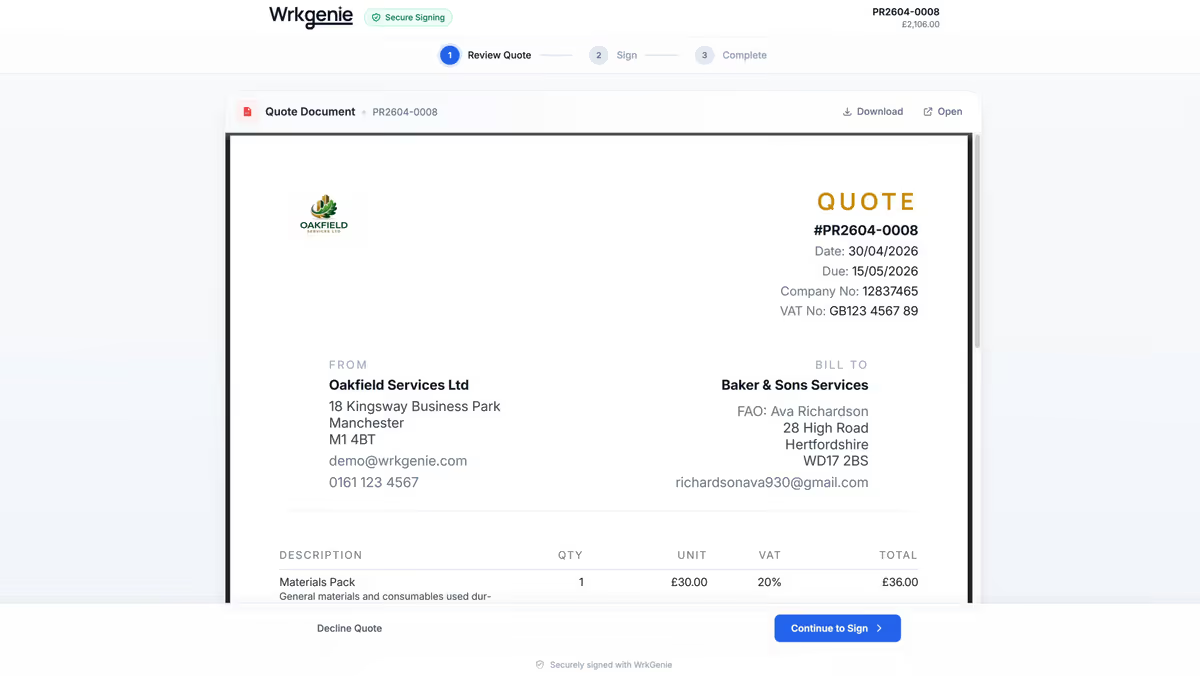
See how a customer reviews and signs a quote
Watch a customer review and sign a WrkGenie quote using example data. The accepted quote stays on the record; you control the booking and invoice steps that follow.
From a job price to a quote and invoice
Whether you quote a one-off clean, a repair or a larger trade job, the customer needs to understand the work and the price. Here is how to keep those details together in WrkGenie.
Step 1
Work out the price
Allow for labour, materials, travel and overheads before setting your selling price. A calculator helps with the figures; you decide what to charge.
Step 2
Describe the agreed work
Add the customer, itemised work and prices to the quote. Make the included tasks, exclusions and any payment terms clear before sending it.
Step 3
Send it for acceptance
The customer can sign on their phone. Keep the accepted quote on the customer record, then arrange the booking when you are ready.
Step 4
Prepare the invoice
Convert the quote into an invoice, review the details and choose when to send it. Accepting a quote does not automatically send an invoice.
Example: pricing a one-off clean
Illustrative figures only. Use your own costs, scope and selling prices.
- 4 labour hours at £30 per hour
- £120
- Materials charge
- £12
- Travel charge
- £8
- Total before any applicable VAT
- £140
The quote should also describe the rooms, tasks and agreed extras. Check what is left after your actual costs with the cleaning job profit calculator.
Used by Tikky Clean
“WrkGenie has helped us bring everything into one place. We can create professional quotes, manage bookings, keep track of customers and stay on top of invoicing without switching between different systems.”
 Tik, Tikky Clean · Read Tik’s customer story
The quote is the start, not the whole story
Keep the accepted scope with the customer record. Confirm the date and access arrangements, book the work, then prepare and review the invoice when it is time to bill.
Quote better with the right next step
Pricing feeds quoting. If you're working out what to charge before you send the quote, these tools help.
Related capabilities
Job quoting software questions
Can I create quotes and invoices in the same software?
Yes. WrkGenie keeps quotes and invoices with the customer record. Convert a quote to an invoice, review it and choose when to send it. Customer acceptance does not automatically issue an invoice.
Can a customer sign a quote on their phone?
Yes. Send a quote for electronic signing and the customer can sign on their phone. The accepted quote stays on the record so you can refer back to the agreed work and price.
Is WrkGenie free quoting software?
WrkGenie offers a 14-day free trial with no card required and no automatic charges. After the trial, Core is £19.99/month for one user and Pro is £39.99/month for three users. The separate free quote builder and pricing calculators work without an account.
Can I separate labour and materials on the quote?
Yes. Use quote line items to describe and price the work, including labour and materials. Review the scope, quantities and totals before sending the quote to your customer.
Is the cleaning calculator the same as quoting software?
The free calculator helps you work out a price using your own figures. WrkGenie’s quoting software stores the quote with a customer, supports customer signing and connects the quote to your booking and invoice workflow.
Ready to run your business from your phone?
Start your free 14-day trial and see how much lighter the day feels when quotes, bookings and invoices live in one place.
On your laptop and phone · iPhone · Android · Web
14 days free · Core £19.99/month for 1 user · Pro £39.99/month for 3 users
No card required to start · No automatic charges after the trial · Cancel anytime